SYNTHETIQ VISION API User Guide
The SYNTHETIQ VISION API is a deepfake detection program that determines whether or not a face image in an input video is one generated by AI or other technology.
This document describes how to use the SYNTHETIQ VISION API.
Contents
Introduction
Using the SYNTHETIQ VISION API requires the URL of the SYNTHETIQ VISION API server and the API token for authentication. Details of these two things and the conditions for a video file subject to fake detection are as follows.
- URL of the SYNTHETIQ VISION API server
- A SYNTHETIQ VISION API request is sent to this URL.
- e.g.
https://...
- e.g.
- To find out the URL, contact the administrator of the SYNTHETIQ VISION API server.
- In this document, it is expressed as
<api-url>.
- A SYNTHETIQ VISION API request is sent to this URL.
- API token
- This token needs to be included in the request header when the SYNTHETIQ VISION API is used. The token is used for API authentication.
- e.g.
xxxx.xxxx.xxxx
- e.g.
- To obtain the token, contact the administrator of the SYNTHETIQ VISION API server, as you do with the URL.
- In this document, it is expressed as
<your-api-token>.
- This token needs to be included in the request header when the SYNTHETIQ VISION API is used. The token is used for API authentication.
- Conditions for a video file subject to fake detection
-
The video file conditions that can be used as defaults are shown below.
Attribute Limit File size Up to 100 MB Duration Up to 3600 sec Width 360 to 4096 px Height 270 to 2160 px FPS 14 to 60 fps - Note: Each of the limitations in this system has been individually tested. However, it has not been evaluated in combination with all the limitations. Depending on the combination, it may not be possible to process the video.
- The human face image in the video must be clear enough and large enough.
- The human face may fail to be detected if its image is too small or unclear.
-
The supported video formats and codecs are as follows.
Format Codec mp4 h264 mp4 hevc webm vp9 avi h264 avi mpeg4
-
Glossary
- Fake detection value
- Any of the values obtained as a result of running fake detection on a posted video.
- These include a frame index, a face region, and information about whether the video is real or fake.
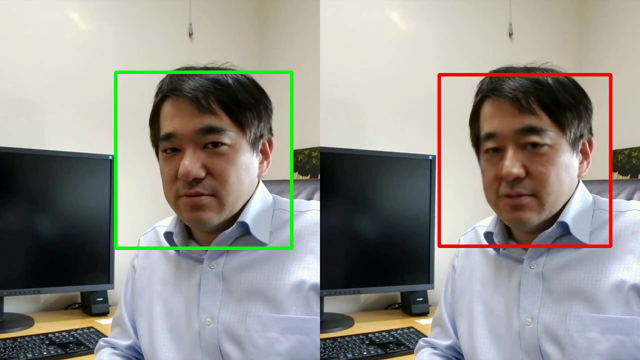
- Fake detected video
- A posted video with fake detection results overlaid on it.
- Green bounding box: Face image found to be real
- Red bounding box: Face image found to be fake
- A fake detected video contains no audio.
-
The format and codec are respectively one of the following.
Format Codec webm vp9 mp4 h264 - To play the video, install the decoder and codec to your video player.
- Examples of the fake detection result
- A posted video with fake detection results overlaid on it.
- Fake detection result token
- This token is used to get the progress of the processing of a posted video, as well as its fake detection values and fake detected video.
Basic flow
- Post a video.
- Get the progress of processing.
- Get fake detection values.
- Get the fake detected video.
sequenceDiagram
  actor U as User
  participant API as SYNTHETIQ VISION API

  Note left of U: To use the API, an API token is always necessary.

  U->>+API: Post a video and request a fake detected video = True/False
  API-->>-U: Fake detection result token

  Note left of U: Use the fake detection result token obtained here <br>when you make subsequent requests concerning the posted video.

  U->>+API: Get the progress of processing.
  API-->>-U: Progress of processing

  Note left of U: For the subsequent requests, <br>the progress of processing obtained here needs to be complete.

  U->>+API: Get fake detection values.
  API-->>-U: Fake detection value

  U->>+API: Get the fake detected video.
  alt Request a fake detected video = True
    API-->>U: Fake detected video
  else Request a fake detected video = False
    API-->>-U: Fail
  end
The following pages describe how to execute these requests.
Basic usage methods
You can use the SYNTHETIQ VISION API in the following two ways.
- Running the API using the curl command
- Running the API using the CLI
synthetiqfor the SYNTHETIQ VISION API
Running the API using the curl command
Note
-
If the warning shown below appears, add the
--insecureoption to the curl command when you execute it, and you will be able to run the API.# Warning curl: (60) SSL certificate problem: self signed certificate More details here: https://curl.haxx.se/docs/sslcerts.htmlcurl --insecure ...
Usage method
The steps of the basic flow of running the API using the curl command are described below.
- Post a video.
-
You can post a video by sending a request with the command shown below.
curl -X 'POST' \ '<api-url>/api/v1/movies?is_processed_movie_file_requested=<true-or-false>' \ -H 'accept: application/json' \ -H 'Api-Token: <your-api-token>' \ -H 'Content-Type: multipart/form-data' \ -F 'movie_file=@<movie-file-path>;type=video/<type>'- Placeholders
<api-url>: URL of the SYNTHETIQ VISION API server<true-or-false>: Fake detected video request- true: You can get the fake detected video.
- false: The creation of a fake detected video is not requested.
<your-api-token>: API token<movie-file-path>: Path to the video file to be posted<type>: Type of the video file to be posted- Set the type as appropriate for the video format.
- Available types: iana / Media Types / video
- For example, when the video format is mp4, set
type=video/mp4.
- Placeholders
-
If the video is successfully posted, you will get the fake detection result token (JSON) shown below as the response. This information will be used in subsequent requests.
{ "hash_": <hash-of-the-movie>, "pub_fake_detection_process_event_id": <pub-fake-detection-process-event-id-of-the-movie> }<hash-of-the-movie>: Hash value of the fake detection result token<pub-fake-detection-process-event-id-of-the-movie>: Event ID of the public fake detected video
-
- Get the progress of processing.
-
You can get the progress of the processing of your posted video as a response, by sending a request with the command shown below.
curl -X 'GET' \ '<api-url>/api/v1/movies/progress?pub_fake_detection_process_event_id=<pub-fake-detection-process-event-id-of-the-movie>&hash_=<hash-of-the-movie>' \ -H 'accept: application/json' \ -H 'Api-Token: <your-api-token>'- Placeholders
<api-url>: URL of the SYNTHETIQ VISION API server<pub-fake-detection-process-event-id-of-the-movie>: Event ID of the public fake detected video<hash-of-the-movie>: Hash value of the fake detection result token<your-api-token>: API token
- Placeholders
-
If the response is
finished, as shown below, the fake detection is complete and you can get the detection result with the following command.{ "progress": "finished" }
-
- Get fake detection values.
-
You can make a request to get fake detection values with the command shown below.
curl -X 'GET' \ '<api-url>/api/v1/movies/values?pub_fake_detection_process_event_id=<pub-fake-detection-process-event-id-of-the-movie>&hash_=<hash-of-the-movie>' \ -H 'accept: application/json' \ -H 'Api-Token: <your-api-token>'- Placeholders
<api-url>: URL of the SYNTHETIQ VISION API server<pub-fake-detection-process-event-id-of-the-movie>: Event ID of the public fake detected video<hash-of-the-movie>: Hash value of the fake detection result token<your-api-token>: API token
- Placeholders
-
- Get the fake detected video.
-
You can make a request to get the fake detected video with the command shown below.
# In this case, the fake detected video file is saved in the current directory. curl -OJ -X 'GET' \ '<api-url>/api/v1/movies?pub_fake_detection_process_event_id=<pub-fake-detection-process-event-id-of-the-movie>&hash_=<hash-of-the-movie>' \ -H 'accept: video/mp4' \ -H 'Api-Token: <your-api-token>'- Placeholders
<api-url>: URL of the SYNTHETIQ VISION API server<pub-fake-detection-process-event-id-of-the-movie>: Event ID of the public fake detected video<hash-of-the-movie>: Hash value of the fake detection result token<your-api-token>: API token
- Placeholders
-
Running the API using the CLI synthetiq for the SYNTHETIQ VISION API
About the CLI synthetiq for the SYNTHETIQ VISION API
- This is simple client software for the SYNTHETIQ VISION API.
- The CLI executable file
synthetiqhandles the API token and fake detection result token as files, allowing you to use the API with simple commands.
Operating systems and architectures supporting the CLI
| OS | Arch | e.g. |
|---|---|---|
| darwin | amd64 | macOS 11 64bit |
| darwin | arm64 | macOS 12 Apple Silicon |
| linux | amd64 | Ubuntu 20.04 64bit |
| windows | amd64 | Windows 10 64bit |
Preparation for use
- First, get the following two files from the administrator of the SYNTHETIQ VISION API server.
- CLI executable file
- File name
- For Windows:
synthetiq.exe - For others:
synthetiq
- For Windows:
- Send requests to the API by using this executable file.
- File name
- CLI configuration file
- File name
.synthetiq.yaml
- The CLI executable file automatically loads this file and uses its information.
- This file includes the following information.
- URL of the SYNTHETIQ VISION API server:
<api-url> - API token:
<your-api-token>
- URL of the SYNTHETIQ VISION API server:
- File name
- CLI executable file
- Add the directory of the CLI executable file to PATH.
- (Reference) For information about how to add a directory to PATH, see: How to add a directory to the PATH? / ask ubuntu
- In the “Usage method” section that follows, examples of the
synthetiqcommand assume that you have a directory added to PATH. - You can also do this in the following way.
- Specify the absolute path to the CLI executable file.
- Move to the directory of the CLI executable file, and then execute
synthetiq.
- Put the CLI configuration file to your home directory.
Usage method
- Post a video.
-
You can post a video with the command shown below.
synthetiq upload <movie-file-path> -o <token-json-path> -r- Placeholders
<movie-file-path>: File path to the video to be posted<token-json-path>: Path to the file (JSON) to save the fake detection result token as a response
- Option
-r: Fake detected video request- This option allows you to get the fake detected video.
- Placeholders
- The JSON file you get as a response is called the fake detection result token file.
- It contains the same information as the fake detection result token mentioned in the section on curl.
-
Contents of the file
cat <token-json-path> #{ # "hash_": <hash-of-the-movie>, # "pub_fake_detection_process_event_id": <pub-fake-detection-process-event-id-of-the-movie"> #}
- Execute the commands shown below, by using this file.
-
- Get the progress of processing.
-
The command shown below lets you get the progress of the processing of the posted video.
synthetiq progress <token-json-path>- Placeholders
<token-json-path>: Path to the fake detection result token file
- Placeholders
-
If the response is
finished, as shown below, the creation of the fake detected video is complete. You are ready to get the detection result with the following command.-
Example of the response
 {
   "progress": "finished"
 }
-
-
- Get fake detection values.
-
The command shown below lets you get fake detection values.
synthetiq get-values <token-json-path>- Placeholders
<token-json-path>: Path to the fake detection result token file
- Placeholders
-
- Get the fake detected video.
-
The command shown below lets you get the fake detected video file.
# In this case, the file is saved in the current directory. synthetiq download <token-json-path>- Placeholders
<token-json-path>: Path to the fake detection result token file
- Placeholders
-
Detailed usage method
- For the CLI command options and other details, see the following.
- Documentation supplied with the CLI
-
help option
synthetiq --help
synthetiq upload --help
synthetiq download --help
synthetiq get-values --help
synthetiq progress --help
Details of the API
-
For details, go to the URLs shown below by using your browser.
<api-url>/docs <api-url>/redoc- /docs, /redoc
- Interactive API documentation and exploration web user interfaces.
- /docs: Swagger UI
- /redoc: Redoc
- /docs, /redoc
FAQ
Q: The API cannot be used.
A: Send the following information to the administrator and seek advice.
- curl command executed to use the API
- Error message
- Video file
- API token
- Fake detection result token
Q: The CLI cannot be used.
A: First, check whether the API can be used.
If the CLI cannot be used although the API can be used, check the following.
- Whether the CLI matches your usage environment (operating system and architecture)
- For example, the Linux CLI does not work in a 64-bit Windows 10 environment.
-
The name of the CLI configuration file must start with a dot.
Good Bad .synthetiq.yaml synthetiq.yaml - If you use the Mac operating system, you must permit the use of the CLI in its security settings. For details, see the links below.
- You must permit your security software to use the CLI. For details, see the manual of your software.
-
If none of the above solves the problem, send the CLI version and the CLI configuration file to the administrator and seek advice.
syntehtiq --version